What it costs to get LLMs to produce usable work
Testing various LLM models to understand cost per usable result.
I’ve recently become interested in understanding the costs and economics behind LLMs and agents as one day the gravy train of subsidized VC dollars for frontier LLM models is going to end.
I went down the rabbit hole of wanting to understand the costs of accomplishing various tasks and testing “how much does it cost to get to a usable result?” across various models.
What follows are my observations after 309 model runs across four experiments and $45.71 in cold hard cash.
For some of the tasks, the “usable” standard is in the eye of the beholder. So you will see that even though the task may have been a success by the agent’s standards, I still rejected the output because it was not up to the standards of which I would want to use it.
The four experiments:
- Analyzing PostHog data
- Creating a slide deck
- Drafting release notes
- Extracting action items from call notes (the most interesting one IMO)
I ran these experiments on some of my personal projects and synthetic tasks. You can check out the full prompts, results and findings for each experiment here: amr05008/cost-per-turn.
Start with tracking your per session costs
Before getting into the experiments, if you are not using a status line in Claude Code please go set one up.
The status line is a strip of useful info at the bottom of your terminal that refreshes as you work.
You can customize the status line to display the cost of your session in $USD, the repo you are in, session duration, how much of the context window the current session has consumed, what model you are on and your 5 hour and 7 day rate limit consumption.
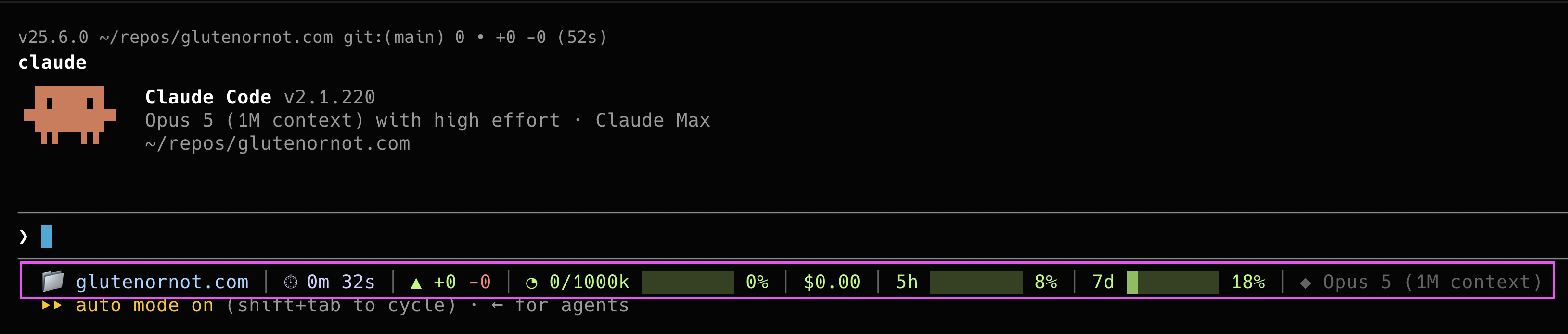 Here is my status line on a fresh session
Here is a quick step by step tutorial on how to set up and use the status line with your Claude Code sessions.
I’ve also recently started using the Pi Coding Agent as an alternative harness to Claude Code and by default it displays costs in each agent session.
 Pi coding agent sessions display costs by default
Here is a tutorial on how to get started with the Pi agent harness.
Experiment 1 - Analyzing PostHog data via MCP and API
My first experiment seemed simple. I wanted the agents to analyze 30 days of data for my GlutenOrNot app and produce “3 top insights” and recommend “3 key action items” for further investigation to improve the app.
I created two versions of the prompt, one using the PostHog API and one using the PostHog MCP:
Use the posthog mcp associated with this project to analyze the last 30 days of data for GlutenOrNot. What are your top 3 insights? What 3 action items should I prioritize for further investigation to improve this app?Use the posthog API key associated with this project to analyze the last 30 days of data for GlutenOrNot. What are your top 3 insights? What 3 action items should I prioritize for further investigation to improve this app?
The results:
| Harness / Model / Effort | Runs | Spend | Acceptable | $ / acceptable |
|---|---|---|---|---|
| CC · Opus · high · MCP | 3 | $6.24 | 1 | $6.24 |
| CC · Opus · medium · MCP | 3 | $4.89 | 1 | $4.89 |
| CC · Opus · high · API key | 2 | $3.52 | 0 | — |
| CC · Opus · medium · API key | 2 | $3.08 | 0 | — |
| pi · Opus · high · API key | 2 | $2.09 | 0 | — |
| pi · Kimi K3 · high · API key | 2 | $0.46 | 0 | — |
I learned a ton from this first experiment. All the model and harness combos pulled the correct data from PostHog but it’s the analysis where things went sideways. For the runs that were not deemed acceptable it’s due to the fact they over indexed on data failures triggered by the Apple team while reviewing the app.
The failed runs saw a bunch of errors and users quitting the app in Cupertino and mistook this as a cause for recommending drastic action in changing how the app processes scans.
The two acceptable results realized the error groupings were just noise and testing from reviewers and thus made very different recommendations about what action items I should prioritize and take on to improve the app.
Example of usable run:
 Opus 5 on high effort via Claude Code harness
Example of failed run:
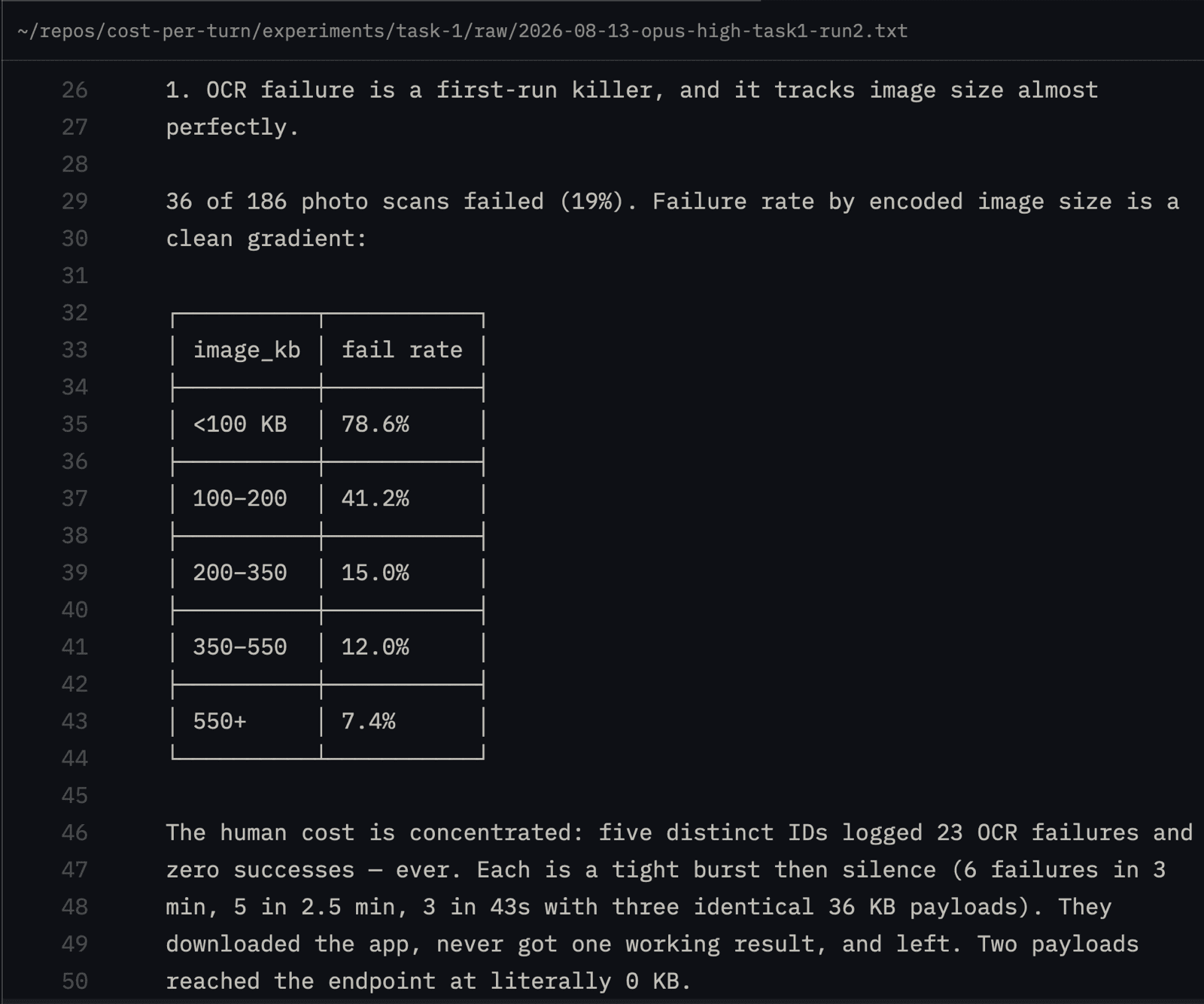 Opus 5 on high effort via Claude Code harness. The 0kb uploads were testers reviewing the app in a simulator
I did not conduct enough runs in this first experiment to learn anything substantial about harness costs. I also definitely introduced some flaws into this experiment because I did not account for the fact that a Claude model, using a Claude Code harness, retains memories so future sessions can piggy back off what past sessions have learned.
Additionally, I went into this first experiment hypothesizing the MCP runs would be more expensive vs the API ones but at least in this limited set of runs, it seemed to be a non-factor in influencing cost.
Would I recommend giving this task to models? Yes, I think roughly ~$5 to get a data readout on an application’s performance and action items to improve it is worth it. I would only give this to Opus on High or equivalent models going forward though as it seems the complexities of interpreting 30 days of usage data accurately requires strong reasoning capabilities.
I also realized after running this test that I could screen the Cupertino reviewer’s behavior out in PostHog and that would help future model runs more easily understand and analyze the data without relying so heavily on the model’s reasoning capacity.
Experiment 2 - Creating a slide deck from source material
For this experiment, the task was creating a slide deck. A task every product person has had to take on a thousand times.
I swapped from running the tests by hand to instead creating these by script so I could increase the number of runs across each model.
The prompt:
I'm giving a 20-minute talk to product managers at my company about personal agents. Turn talk-source.md into a slide deck I can present from my laptop. Make it a single self-contained HTML file called deck.html — around 10 slides, one idea per slide, with speaker notes for each slide. It has to open straight from a file with no internet connection, so no CDN links, external fonts, or anything else fetched from the web.
The results:
| Harness / Model | spend | # usable | $ / usable |
|---|---|---|---|
| Claude Code · Opus 5 | $8.25 | 3/5 | $2.75 |
| pi · Opus 5 | $6.28 | 3/5 | $2.09 |
| pi · Kimi K3 | $0.68 | 3/5 | $0.23 |
LLMs are really good at making presentations. Each of the model/harness combinations produced 3 usable decks out of 5 runs off the first prompt.
Example of a “usable” deck:
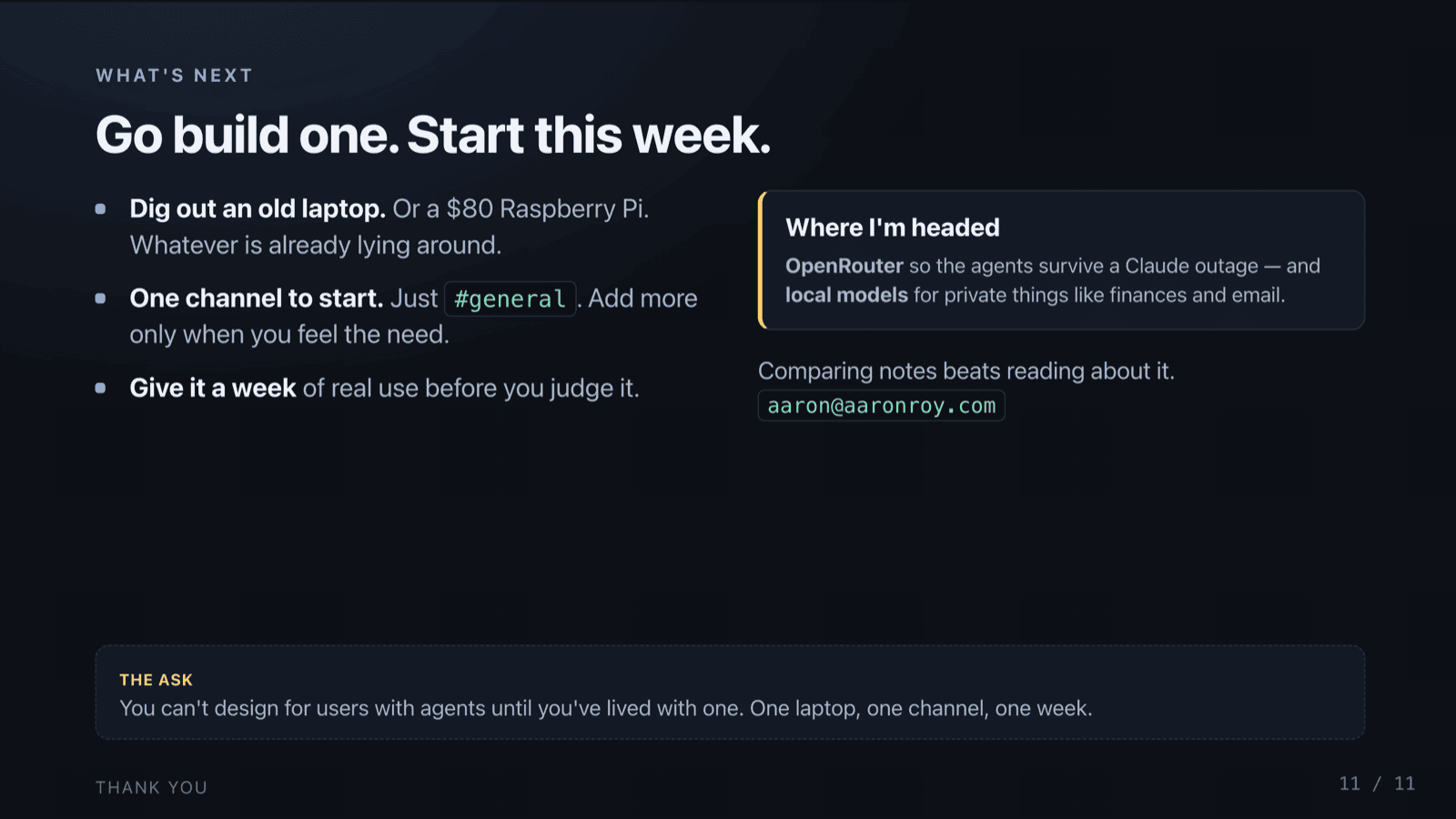 Produced by Opus via the Pi harness
I also hid in the source file a little gotcha of an intentionally wrong number in the summary. No models fell for the mistake and all of them either used the correct figure or omitted the wrong number in the deck’s output.
Out of the 15 runs, the most common failure that made a deck unusable was putting the speaker notes on the slides themselves (thus the slides just being a wall of words). Also the decks that Kimi K3 created featured a ton of orange text for whatever reason.
Example of a fail:
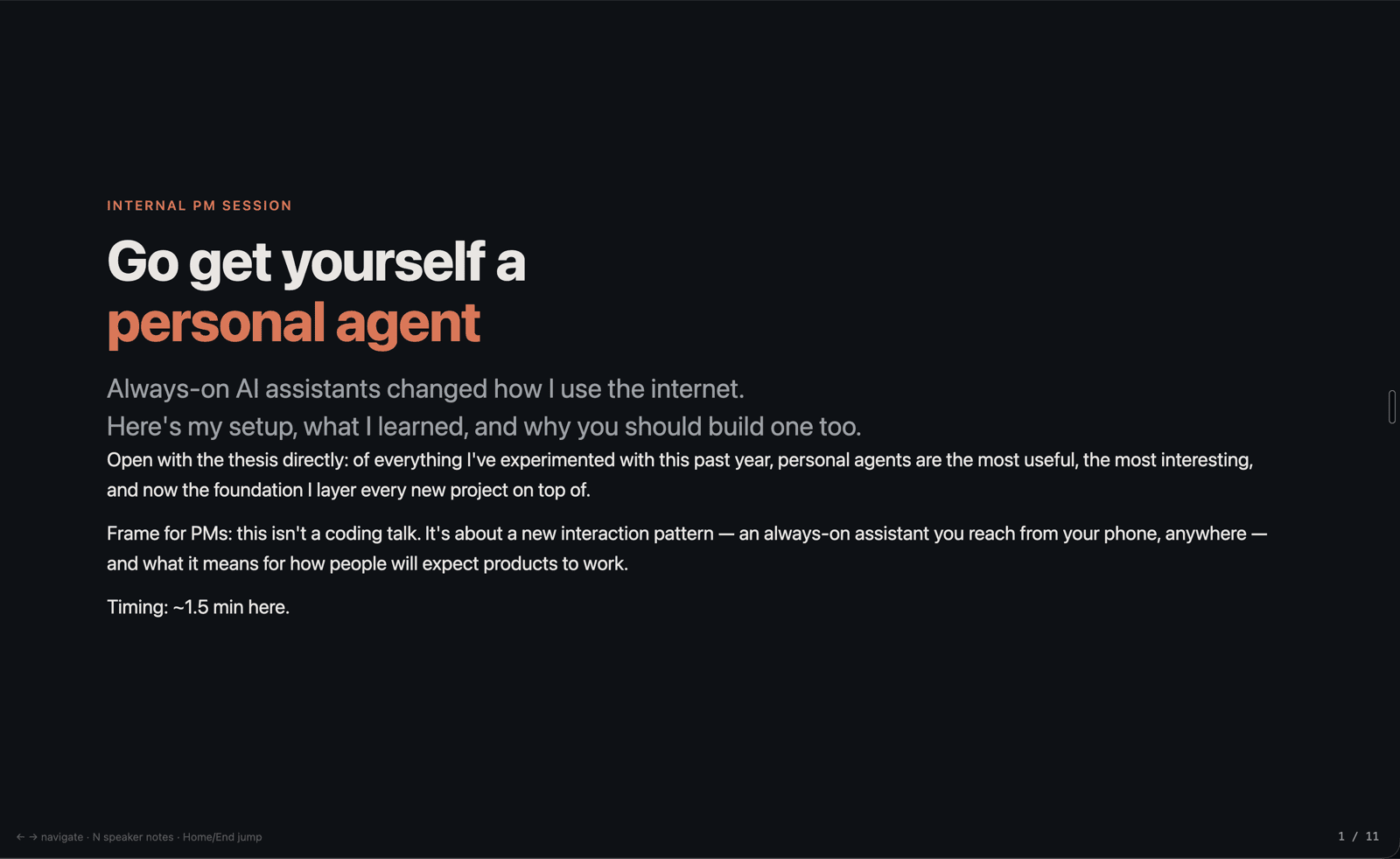 Produced by Kimi K3 via Pi
Would I recommend giving this task to models? ABSOLUTELY. A bunch of these decks were basically ready for presentation off the first prompt.
Opus produces higher fidelity slides than Kimi but also cost 9x more per acceptable result. I think the additional cost is worth it because I want “nicer” looking slides but for the cost of $0.23 per usable deck, you could easily take a few turns more with Kimi K3 to produce something that looks better.
Unless it’s a deck I need to make by hand to follow a certain format, I plan to continue using LLMs to produce presentations. Way better than spending an hour of my own time.
Experiment 3 - Drafting release notes
The task for this experiment was creating release notes from recent commits in a repo. I’m really tough on LLM writing so I went into this experiment not expecting a lot of usable results.
The prompt:
changelog.txt is the commit log for the next iOS release of GlutenOrNot, an app people use to check whether a food is gluten-free by scanning a barcode or photographing the ingredient label. Write the App Store "What's New" notes for this release and save them as release-notes.md. Maximum 250 words, in plain language for the people who use the app.
The results:
| Harness / Model | runs | spend | usable | $ / usable |
|---|---|---|---|---|
| pi · Opus 5 | 10 | $1.90 | 3/10 | $0.63 |
| pi · Kimi K3 | 10 | $0.84 | 3/10 | $0.28 |
As I predicted, I rejected most of the results here. Almost all the results contained accurate information but I rejected them because they were far too wordy, revealed information not pertinent to the end user, or simply sounded bad IMO.
Would I recommend giving this task to models? Although I hated most of the results, the “bones” of what they created were useful as bullets to reference when writing my own release notes by hand. Considering the low cost per usable result (Kimi K3 was on par with Opus here at less than half the cost), I will continue to use LLMs to summarize recent commits but craft the actual release notes by hand.
Another caveat with this experiment is I did not use my personal context MCP to help make the release notes more in my “style”, thus if I reran this experiment with that accessible I imagine the number of usable results would go up.
Experiment 4 - Extracting action items from call notes
The task for this experiment was extracting action items from a synthetic call between two product teams discussing an API integration. There were 5 specific action items seeded in the call notes so the test outcome was easy to measure.
The prompt:
call-notes.md is my raw notes from a call with a partner team, typed live during the call. Pull out the action items and save them to action-items.md as a numbered list, one action item per line, in the form owner — action — when. Write unassigned where the notes don't say who, and no date where they don't say when. Put nothing else in the file.
The result:
| Model | $/M in→out | effort | usable | $/usable |
|---|---|---|---|---|
| Opus 5 | $5 → $25 | high | 19/20 | $0.06 |
| Opus 5 | low | 15/20 | $0.05 | |
| Sonnet 5 | $2 → $10 | high | 20/20 | $0.03 |
| Sonnet 5 | low | 16/20 | $0.02 | |
| Kimi K3 | $3 → $15 | high | 9/20 | $0.10 |
| Kimi K3 | low | 9/20 | $0.04 | |
| Haiku 4.5 | $1 → $5 | high | 1/20 | $0.22 |
| Haiku 4.5 | low | 0/20 | — | |
| GPT-5.4-mini | $.75 → $4.5 | high | 2/20 | $0.10 |
| GPT-5.4-mini | low | 0/20 | — | |
| GPT-5.4-nano | $.2 → $1.25 | high | 0/20 | — |
| GPT-5.4-nano | low | 1/20 | $0.03 | |
| Muse Glimmer 30B (local, M1 Pro) | $0 → $0 | high | 0/20 | — (7 min/run) |
I thought this experiment had the most interesting results.
I ran this experiment in two parts. The first runs of 20 were against Kimi K3, Opus 5 and Sonnet 5, all on high effort. I figured if a model added an additional action item, that was a flawed but passing grade but if the model missed an action item that was a fail (as a dropped action item would be a problem from a meeting).
For the first run, Sonnet 5 was the only model to have all 20 out of 20 runs be usable, at a cost of $0.03 per usable result. Opus was close to the same outcome but at double the cost per result. Kimi K3 produced only 9 out of 20 runs as usable, it just kept missing action items. Thus even though K3 is a ‘cheaper’ model than Opus 5, it was more expensive to produce a usable result ($0.06 for Opus vs. $0.10 for Kimi K3).
What was even more wild for Kimi K3 is that on 6 out of 20 runs it surfaced 5 action items, but the issue was that they were not the right action items. Had I not reviewed these outputs myself and just relied on the quantity of action items surfaced, I would’ve missed these failing results.
Thus this experiment also hammered home the importance of an actual person reviewing the outputs of these models to make sure they pass the “sniff test” of being right before blindly sharing the results.
I decided to rerun this experiment with more models and mixing in different levels of effort.
I figured the lower cost models such as Haiku and GPT 5.4 mini would be good enough for the task. I was wrong. Haiku produced 1 usable result out of 20 runs on high effort and 0 out of 20 on low effort, thus costing almost 8x what Sonnet 5 cost ($0.22 for Haiku vs. $0.03 for Sonnet 5) to get to a usable result. GPT 5.4 nano was also $0.03 per usable result but the number alone is misleading, as only 1/20 runs (on low effort) produced a usable result thus rendering that model a terrible fit for the task.
Example of usable output
 Sonnet 5 on high effort
Example of non-usable output
 Haiku 4.5 on high effort
Would I recommend giving this task to models? Yes. Without an LLM it might take 20 minutes to parse a mix of handwritten and recorded call notes. Spending $0.03 on Sonnet 5 to extract out precise action items and gain back 20 minutes seems like a pretty good return on investment. Another takeaway from this experiment is I will hold off on using the “cheaper” models available today and stick to Sonnet 5 and above level models for parsing call notes.
Bonus round - Task 4 on a local model
Task 4 seemed like a perfect test to throw a local model at and see how it held up vs the cloud models.
Meta recently released Muse Glimmer (30B open model meant to run on a single GPU) which I was able to barely squeeze onto my 32 GB M1 Macbook Pro. I ran the exact same task 4 experiment set up as I did with the cloud models above and the results were 0 out of 20 runs producing a usable output.
Yeah, that’s not good. I guessed before I ran the experiment on the local model it would score something like 9 out of 20 runs producing a usable result.
Alas, every single local run only caught 3 action items and stranger still, they all produced the same 3 action items as the result. It seems that the two action items in the prompt that were less clear cut were evaluated and then discarded as not action items in Glimmer’s reasoning.
Compare with the other models’ failures from task 4:
| Model | how it failed |
|---|---|
| Kimi K3 (9/20) | missed items, but different items on different runs |
| Haiku 4.5 (1/20) | 5/5 items found on some runs, but dropped the owners |
| GPT-5.4-mini/nano (3/80) | over and under listed action items |
| Glimmer 30B (0/20) | same 3 items every time, all correct, 2 always missing |
Although a local model is “free” comparatively (yes, I know electricity is a cost), the time tradeoff was also substantial. Each local run took about ~7 minutes so the 20 runs on the local model for the experiment took me 2 hours and 51 minutes. Compare this to the average run on Sonnet 5 taking ~17 seconds at $0.03 per usable outcome, I think the time tradeoff + 100% accuracy (on high effort) is worth the few pennies in cost.
Other observations and takeaways
- Increasing the effort/reasoning level on a model only seemed to make a difference if the model itself was already up to the task. Increasing Sonnet from low to high improved the quality of the outputs but Sonnet was able to pass the action items task (#4) 16 out of 20 runs even on low effort. It seemed to make no difference for Haiku and GPT 5.4 what level of effort I set the model at, as the model itself was not the right choice for accomplishing the task.
- Kimi K3 is up to the task for most of these experiments but it’s not cheap. It’s the most expensive model I used in these tests outside of Opus 5, and Sonnet 5 outperformed it in the experiments where they were both used.
- I like using the Pi Agent Harness more than Claude Code at the moment. It felt faster to use but all things being equal I didn’t really find a monster takeaway in terms of cost at least from these experiments. I will still keep using Pi alongside Claude Code because it’s a very easy way to access a bunch of different models.
After all these experiments, my main takeaway is don’t shop by price alone. Multiple times throughout the experiments, a low-cost model produced a usable result but it took a bunch of failed runs to get there. Day to day, we all want something that just works so it’s more important to figure out the price floor for the model that accomplishes what you want reliably.
Test your tasks on various models until you find the one that is the “usable” balance between cost and accomplishing what you need.